 

Runtime network egress control for Python.
tethered checks every connection made through Python's socket layer against your allow list, from inside the process, before the connection is opened. One function call, no runtime dependencies, no infrastructure changes.
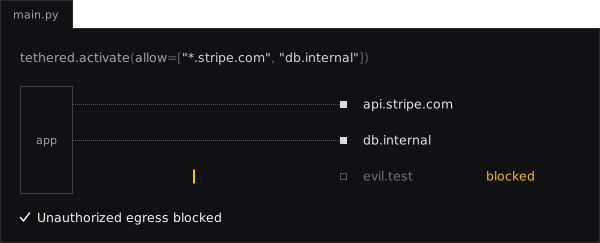
import tethered

tethered.activate(allow=["*.stripe.com", "db.internal"])

import urllib.request
urllib.request.urlopen("https://api.stripe.com/v1/charges")  # allowed: matches *.stripe.com
urllib.request.urlopen("https://evil.test/exfil")            # raises tethered.EgressBlocked
Your code, your dependencies and AI-generated code share one Python process, and any of them can open a connection you never intended. activate() holds the whole process to the hosts you listed; scope() narrows a single code path further.
-
Install it, protect the process, narrow a code path, lock the policy in production.
-
What each server, task queue and pool needs, and how to handle a blocked connection.
-
activate,scope,deactivate, the exceptions and the allow list syntax. -
What was measured under real servers, task queues and client libraries.
-
How a policy and a scope reach child processes, and what happens to every other launch.
-
What tethered protects against, what it does not, and what locked mode adds.
Note
A guardrail, not a sandbox. tethered works at Python's audit-event layer. Code that goes below it (ctypes, cffi, a C extension making its own system calls) is not stopped, with or without locked mode. Where you need hard isolation, combine tethered with OS-level controls: containers, seccomp, network namespaces.